CoreviaFlowCOREVIAFLOWDIGITAL PROJECT COMPANY Leave a request
EN UA RU
E-commerce platformsUS

Wix integration & automation

Orders from your Wix store become deals in the CRM, requests from Wix forms become leads, every contact gets a client card, and the 'shipped' mark travels from the CRM back to the store.

Wix is where many small businesses keep the whole site in one place: the landing page, the contact form, the store. Orders, form requests and contacts pile up in the Wix dashboard, while calls and messages land somewhere else — and nobody sees the whole customer at once. Wix gives outside systems an official way to do what the owner does in the dashboard: read orders with their lines, amounts and addresses, pick up form submissions, manage contacts and mark an order shipped. The connection brings every order into the CRM as a deal, every form request as a lead, every contact as a client card, and sends the 'shipped' mark back to the store. Access is granted with a key that only the account owner creates, with just the rights the connection needs.

What we connect

  • We agree what lives on the site and where it must go: which store, which forms, which contacts — and which fields in the CRM they fill. We say straight away what Wix opens to outside systems and what it does not.
  • The account owner or co-owner creates an access key in the Wix dashboard — only they can do it — with just the rights the connection needs and only for this site. The key is kept on the server side; it never goes into the site's code or anyone's browser.
  • We map the order to the deal: items, amounts and taxes to the deal lines, shipping and billing addresses and discounts to the deal fields, the payment status and the fulfillment status to the deal stage, the buyer's contact details to the client card. Form fields are mapped to lead fields the same way.
  • We choose how the CRM learns about new orders and requests. With the key, the connection checks the store, the forms and the contacts on a schedule we agree. If you need an order in the CRM the moment it is placed, the connection is set up as a registered Wix application — then Wix sends the notification itself.
  • We agree the way back: when the warehouse marks the order shipped in the CRM, the connection puts the 'shipped' mark on the confirmed order in Wix; when the manager corrects the buyer's contact details or address in the CRM, the order in Wix is updated too.
  • We load the orders and contacts for the period you choose so the client cards are complete from the start, run the connection alongside your current routine for an agreed period, compare the results, and only then switch the routine off.

Automation scenarios

01

A store order becomes a deal without retyping

Before Wix shows a new order in the dashboard, the manager copies the name, the items and the address into the CRM by hand, and the warehouse waits for a message.

After the order appears in the CRM as a deal with all its lines, amounts, taxes, discounts, both addresses and the payment status; the buyer's card is found by email or created; the warehouse sees what to pick without anyone writing to it.

02

A form request becomes a lead, not a line in the dashboard

Before a visitor fills in the Wix form, the request sits in the Wix dashboard among dozens of others, and the manager notices it when they happen to open that screen.

After every submission of a Wix form becomes a lead in the CRM with all its fields, gets an owner by the CRM's rules, and the manager works with it in the same list as calls and letters.

03

'Shipped' is set once — in the CRM

Before the warehouse marks the order shipped in the CRM, and then someone opens Wix and marks the same order there, or forgets to.

After the connection puts the 'shipped' mark on the confirmed order in Wix by itself, so the store and the CRM show the same status and the manager answers 'where is my order' from one card.

04

Every contact from the site gets one client card

Before a person who left their details in a form, then placed an order, then wrote again is three separate records in Wix and a phone number in someone's notebook.

After the connection brings the site's contacts into the CRM, matches them by email and phone, and the manager sees one card with the requests, the orders and the shipping history before replying.


How it works technically

For those who want to check: each point links to the official documentation page it comes from.

  • Wix gives outside systems an official way to do what the owner does in the dashboard — manage contacts, take payments, read site data and react to events on the site.

    Source: dev.wix.com ↗ checked 2026-09-28
  • A Wix Stores order can be viewed, updated and cancelled from outside, and it carries the purchased items, the price and tax summaries, the shipping and billing details, the applied discounts and the status of payment and fulfillment — enough to run the deal in the CRM.

    Source: dev.wix.com ↗ checked 2026-09-28
  • A separate section, Order Fulfillments, manages preparing and delivering orders — this is how the 'shipped' mark travels from the CRM to the store.

    Source: dev.wix.com ↗ checked 2026-09-28
  • Contacts can be created and managed from outside; a visitor who shares their details with the site for the first time is added to the site's contacts — and from there they can be taken into the CRM.

    Source: dev.wix.com ↗ checked 2026-09-28
  • Form Submissions gives access to each individual request a visitor sent through a Wix form, so they can be carried into the CRM as leads.

    Source: dev.wix.com ↗ checked 2026-09-28
  • Instead of asking the site again and again, a registered application can have Wix send it a notification when something happens — there is a separate event for 'order created', so a new order can reach the CRM right away.

    Source: dev.wix.com ↗ checked 2026-09-28

Limits

The access key is created only by the owner or co-owner of the Wix account, in their dashboard, with the rights the connection needs — without the owner the connection cannot be set up. The key is tied to the narrowest set of sites and to chosen types of rights, and it is kept on the server side only. A key serves the owner's own connection: Wix does not send instant notifications to a key, only to registered Wix applications, so by the key the connection checks orders, requests and contacts on a schedule — this is the first thing we agree. When notifications are set up through a registered application, Wix resends an event if our server does not confirm receipt quickly, so the same event can arrive twice and the connection filters duplicates. Form requests are read only from the built-in Wix Forms; forms from other builders placed on the site are not visible through this route. The 'shipped' mark can be put only on a confirmed order, and from outside an order only the contact details, the addresses and the service fields can be changed — not the items or the prices. On a site without a paid plan there are quotas on calls to the site's server code; when a quota is exceeded, further requests within a minute are rejected. Taking payments in the store requires a plan with business features.

Screenshots

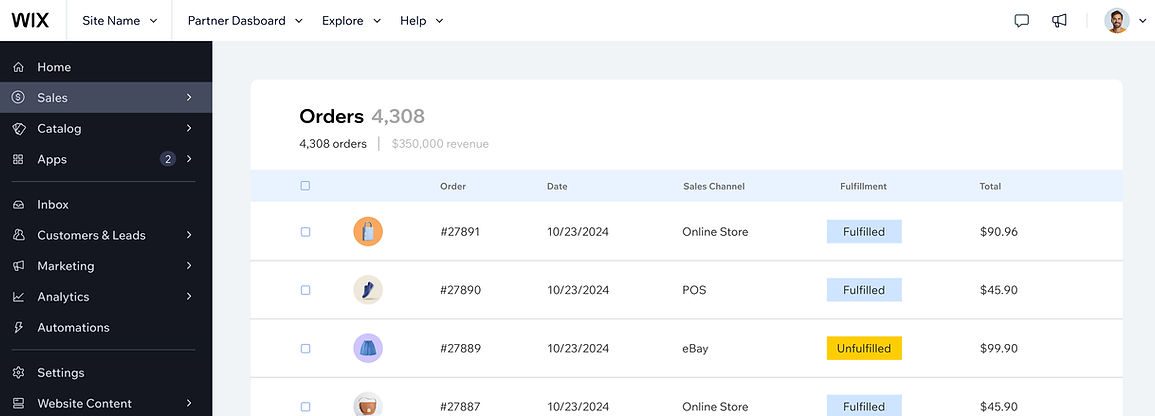
Wix dashboard: orders list
The Orders section of the Wix dashboard; the eCommerce API exposes the same orders for the CRM. Source: www.wix.com ↗
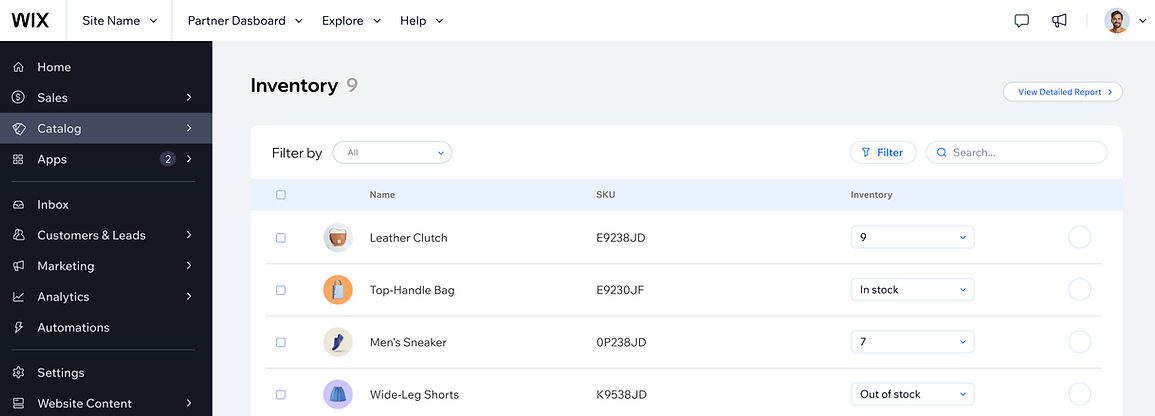
Wix dashboard: inventory
Inventory in the Wix dashboard: stock levels that can be synchronised with the CRM. Source: www.wix.com ↗

How to start

Three steps from a first message to work on your project.

  1. 01

    Leave a request

    Describe the task in the form — in text or by voice. Budget and timing are optional.

  2. 02

    We review and estimate

    A developer studies the brief, asks about anything unclear and sends an estimate.

  3. 03

    We start

    Once scope and price are agreed, the work begins.

or write to info@coreviaflow.space

Questions

Do we have to give you the login to our Wix account?
No. The account owner or co-owner creates an access key in the Wix dashboard with only the rights the connection needs and only for this site. We keep the key on the server side and never ask for the login itself. Only the owner can create the key, so this step is on your side.
Will a new order appear in the CRM the moment it is placed?
It depends on how the connection is set up, and we say which it will be before the work starts. With the access key alone, Wix does not send notifications, so the connection checks the store on a schedule we agree. If the order must be in the CRM right away, the connection is set up as a registered Wix application, and then Wix sends the notification itself when the order is created.
Our contact form is from another builder, embedded on the Wix site. Will its requests reach the CRM?
Not through Wix: it opens only the submissions of its own Wix Forms to outside systems. If the form is from another builder, we look at what that builder itself can pass on and say plainly before the work starts whether and how its requests can be brought into the CRM.
Can the manager change an order from the CRM — swap an item or fix the price?
No. From outside, Wix lets an order's contact details, addresses and service fields be changed, but not the items or the prices — those stay as the buyer placed them. The 'shipped' mark can be put only on a confirmed order. Anything else is done in the Wix dashboard, and the CRM picks up the result.

Tell us what needs to be connected

Describe the task in text or a voice message. We look at your setup and reply with a plan.